Why Apple Put Touchscreen on the Macbook Pro
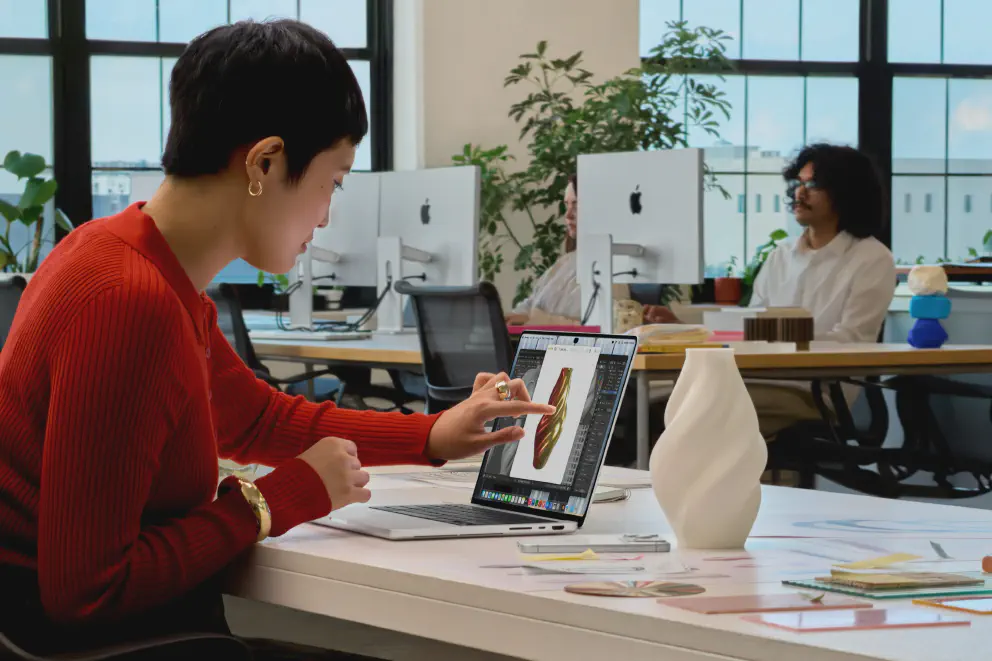
By now, we’ve all seen the clip where Steve Jobs explains why Apple would never put a touchscreen on the Mac. At the 2010 “Back to the Mac” event, his argument boiled down to one line: touch surfaces don’t want to be vertical. Reach out to a laptop screen all day and your arm gets tired, a problem usually called “gorilla arm”.
He was right then, and honestly, he’s still right today. Your arm will get tired. A laptop screen will wobble when you poke it (and if you push hard enough, you might break something). And macOS was built around a pointer, not a fingertip.
And yet, on October 28, Apple announced a MacBook Pro with a touchscreen. So what changed?
It’s a Long Time Coming, Sort of
Let’s be clear: a touchscreen Mac was never at the top of anyone’s wishlist. But if you’ve been paying attention, Apple has been nudging macOS in this direction for years.
- Control Center arrived in macOS Big Sur in 2020 with big, chunky toggles that are far larger than any mouse needs.
- Launchpad brought an iOS-style grid of apps to the Mac back in 2011. Few people actually used it, and it has since been folded into a plain Apps view.
- System Settings was redesigned to look and feel more like its iPhone and iPad counterpart, with touch-friendly rows and toggles.

Then there’s the elephant in the room: Apple has sold a touch-first, desktop-class computer for years. The iPad Pro has shared Apple silicon with the Mac since the M1 iPad Pro in 2021. You navigate it with your fingers, and you can snap on a keyboard and trackpad when you want a laptop. Touch on the Mac is less of a leap than it looks, because Apple has been quietly closing the gap from both sides.
Apple’s own executives say as much. Marketing chief Greg Joswiak told WIRED that most pros own an iPad and nearly all of them own an iPhone, so touch is second nature to them. He added that a generation of young creators now using MacBook Pros simply expects the screen to respond (iPhone in Canada’s write-up of the interview). If you’ve ever watched a kid tap a laptop screen and get confused when nothing happens, you know exactly what he means.
How Apple made it work
The tweaks Apple made are what separate this from the touch laptops of the Windows world:
- The touch sensor is built into the display panel, not layered on top of it. Apple says this reduces latency so it feels like you’re touching the content itself (Apple Newsroom).
- A redesigned hinge gives more stability when you tap, which tackles the wobble problem directly. Apple also re-did the thermal design so warm air is routed away from the display.
- Small targets grow when a finger approaches. Menu items and the traffic-light window buttons enlarge first, so you can confirm what you’re about to hit. That’s a far cheaper fix than redesigning all of macOS.
- Old apps still work. macOS automatically translates touches into clicks, so existing apps respond to touch on day one.
A Nice Place to Visit, but Not To Stay
Here’s the key to understanding the whole thing: touch on the MacBook Pro is a bonus, not the way you’re meant to use it.
Think of the Apple Pencil. It’s a wonderful add-on for the iPad, and now Apple is bringing it to the iPhone Duo too, but nobody needs it to use the device. Touch on the Mac sits in the same category. Apple’s own press release says the touch experience works alongside the keyboard shortcuts and trackpad gestures pros already know. In practice, you’d use it for things like:
- Swiping through a webpage or pinching to zoom into a photo.
- Double-tapping a window to fill the screen, or flicking it to tile into place.
- Pulling down the new Dynamic Island to bring up Spotlight or Siri.
- Drawing directly on the screen in Pixelmator Pro, or playing a software keyboard in Logic Pro, instead of being limited to the trackpad area.
CEO John Ternus said nearly the same thing in his WIRED interview: the Mac is still first and foremost built around the trackpad and keyboard, but there are moments when touch is comfortable and handy. The important part is why Apple waited. Ternus said touch had to arrive without making the Mac “lesser in any way”, meaning it couldn’t make the machine heavier or thicker. That only came together, he said, with the new OLED display.
The numbers back him up. The new MacBook Pro is lighter than its predecessor: the 14-inch weighs about 3 pounds (half a pound less) and the 16-inch about 4 pounds (0.7 pounds less). The slimmer tandem OLED display stack made that possible, which is also what makes the new screen the real star of the show. Apple claims up to 2,000 nits of peak brightness and a 10,000,000:1 contrast ratio on what it calls the PROLED XDR display.
And that’s the thing: the PROLED XDR display is the real headline of this MacBook Pro, but everyone is talking about touch. It’s the rare spec that gets people arguing about Steve Jobs.
The Catch
None of this makes the MacBook Pro an iPad. As Bloomberg’s Mark Gurman has pointed out, it’s still a traditional clamshell. It doesn’t fold back 360 degrees, the screen doesn’t detach, and it doesn’t support the Apple Pencil, so it’s unlikely to eat into iPad sales (summary at iPhone in Canada). Apple isn’t merging its product lines. It’s letting the Mac borrow one useful trick.
It’s also not cheap. The 14-inch with M5 Pro starts at $2,899 and the 16-inch at $3,399, while M5 Max configurations run from $4,499 to $4,799. Macworld’s pricing table puts the 16-inch M5 Max about $400 above its non-touch counterpart. The standard M5 Pro and M5 Max MacBook Pro remains in the lineup for now, so you can still skip touch if you’d rather not pay for it. One report suggests that might not last, as next year’s models could drop the non-touch version. That’s a rumor, so take it with a pinch of salt.
So, Was Jobs Wrong?
Not really. The arm-fatigue argument hasn’t gone away, and Apple isn’t pretending otherwise. What changed is everything around it: displays that are thinner and lighter, hinges and sensors that tolerate a poke, software that adapts to a finger, and a generation of users who grew up tapping glass.
Apple’s real argument isn’t “touch is better for the Mac”. It’s “touch doesn’t have to cost you anything”. If it never makes the MacBook Pro worse and occasionally makes it nicer, why not? Whether you’ll actually reach for the screen is something we’ll find out when it lands on November 6.
Will you use it, or stick to the trackpad? Let me know.
Sources
- Apple Newsroom: Apple unveils groundbreaking MacBook Pro with PROLED XDR Display (October 28, 2026)
- iPhone in Canada: Why Apple Finally Put a Touchscreen on the Mac, According to Ternus, covering the WIRED interview with Ternus, Srouji and Joswiak
- 9to5Mac: Apple execs discuss touch about-face
- iPhone in Canada: Mark Gurman on why a touchscreen MacBook won’t kill the iPad
- Macworld: Touchscreen MacBook Pro release date, design, specs and price
- TechRepublic: iPhone Duo brings Apple Pencil to the iPhone
Love this? Consider buying me a coffee!