Amazon Web Services, or AWS, is one of the most transformative inventions for the internet. Most people would not know about it, but you can think that almost every online service, every Fortune 500 company, or every modern convenience would have been on AWS now, or at least at one point in time.
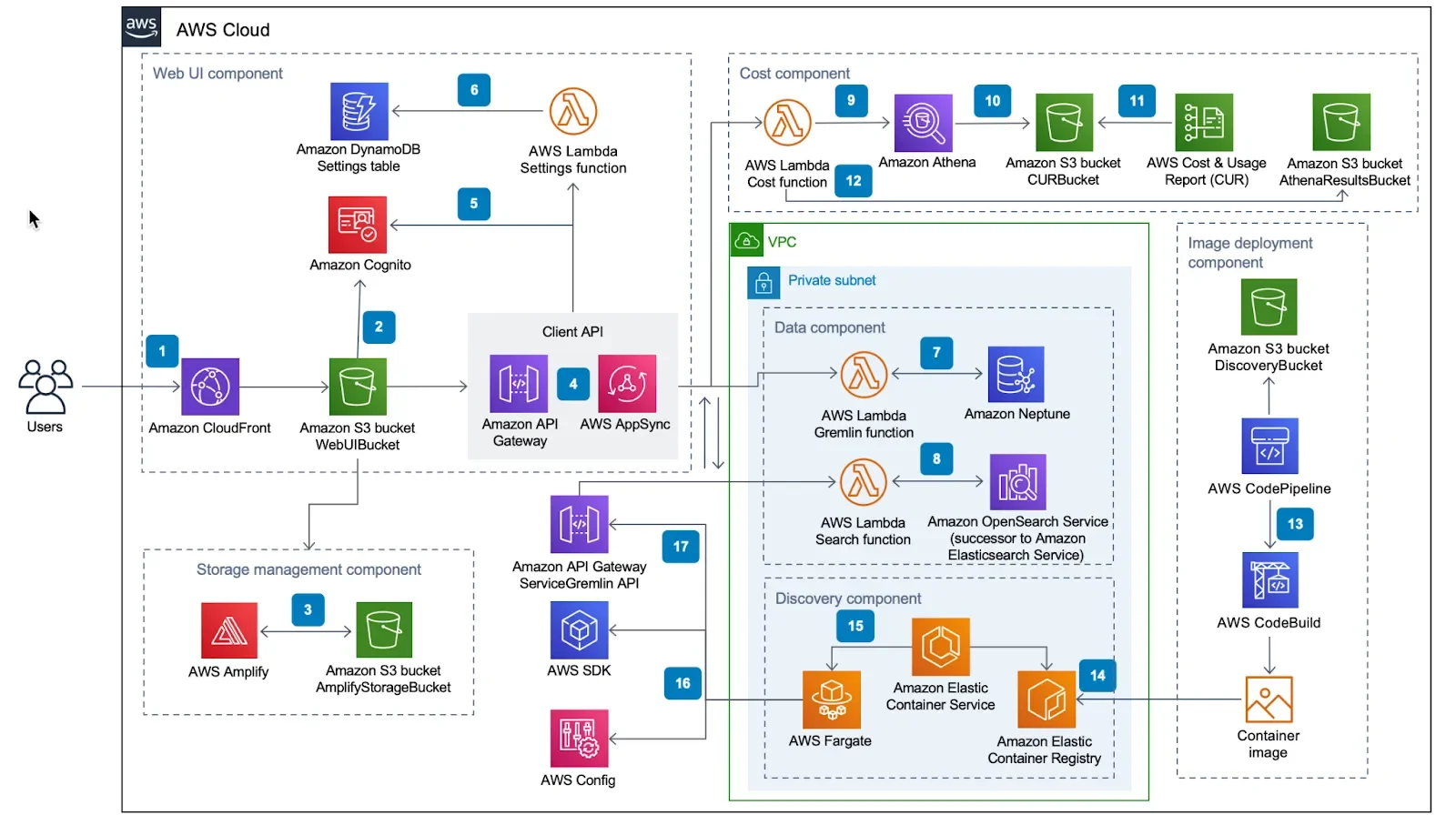
AWS started off with just a handful of products. Just a few servers and maybe a place to store your files online. Since then, there are hundreds of products, and for the uninitiated, it’s daunting to understand what AWS is and what the best way to use it is. The goal of this little guide is to demystify the monolith of internet infrastructure that is AWS.
Overview: What is Cloud Computing and what is AWS?
When the internet started, people would publish their websites right from their own computers. Back then, the World Wide Web was more like a wild, wild web. There were a lot of freedoms and also a lot of problems with this approach. Security for one, and if your site gets too popular, your computer or internet pipe might not be up to the task.
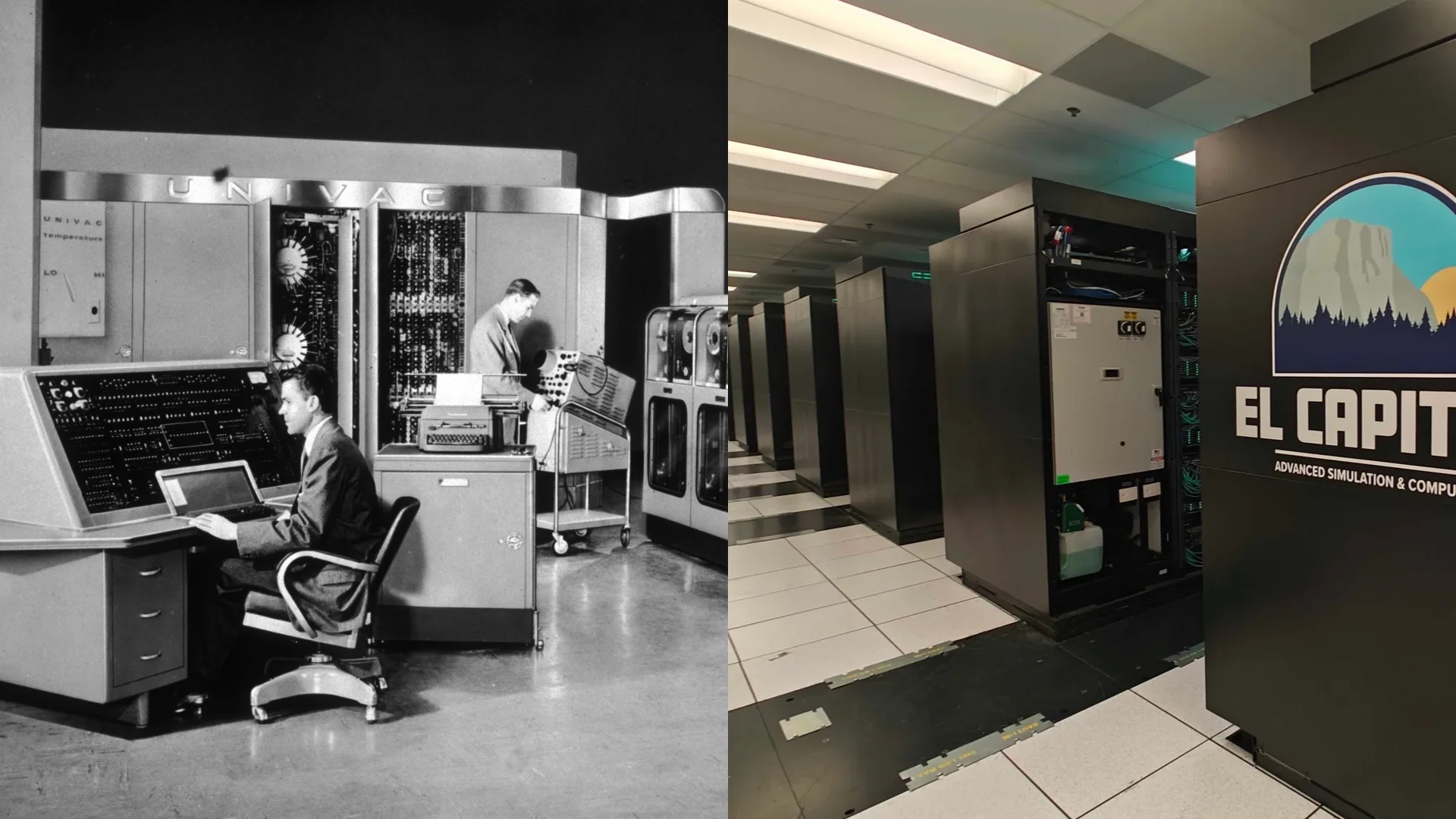
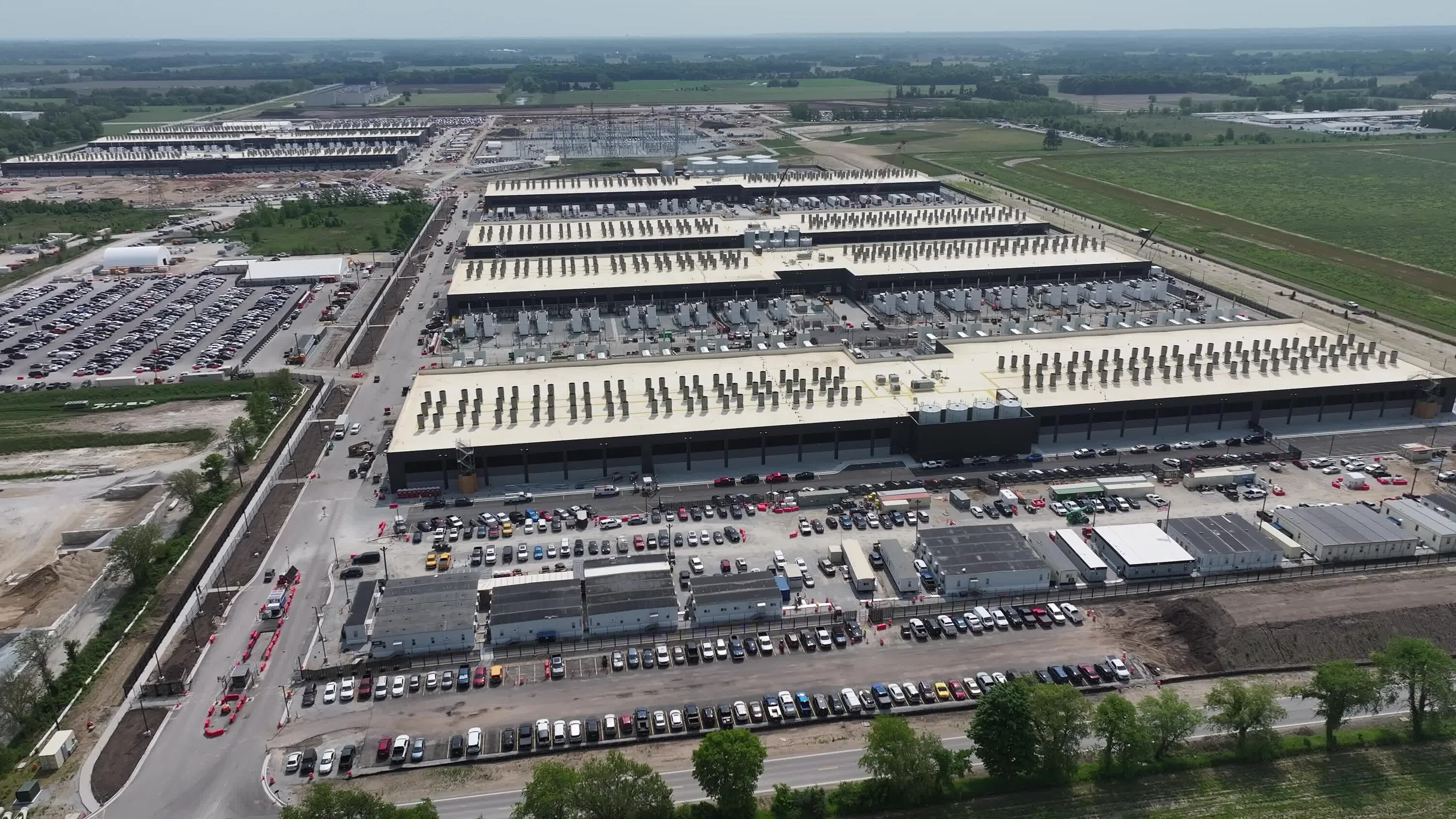
So eventually dedicated computer rooms were created to hold dedicated computers that serve data to the users (or clients, as we call them back in the day) and huge internet pipes that go into that room. We also put big walls and big locks around the server rooms to make sure nobody breaks into them. We call them servers, of course. Eventually, those server rooms got so big we coined a new term: datacenters. Access to those massive server rooms is restricted. So, how do we access the powerful computing power? Remotely through the internet, of course.
Back in the late 1990s, when the internet was young, there was a young upstart who sold books online. It has a big ambition, and when the founders built the company, they chose a name that represents and matches their big ambition: Amazon. Eventually, it transitions from selling books to selling everything to everyone in the world. And to do that, you will need a global network of interconnected computers to serve every human being and other machines.
How to make it simple
In the most basic form, cloud computing solutions like AWS are akin to renting someone else’s computer in a huge server farm for your own use. Each product in AWS has a specialized function that was once designed to solve an Amazon problem, but has been generalized for mass market appeal.
The Virtual Datacenter
The easiest way to think about AWS is how you would imagine a datacenter in any company would have, AWS most likely would have that too. Servers? Of course. Database & App server? Amazon basically runs on that. Specialized storage array with disk-to-disk backup, including tape library? With the number of things Amazon sells, together with having a music and video streaming business, those things are pretty necessary. How about the network equipment to publish your site everywhere in the world? Amazon has the same problem, and you can rent out Amazon’s solutions, too.
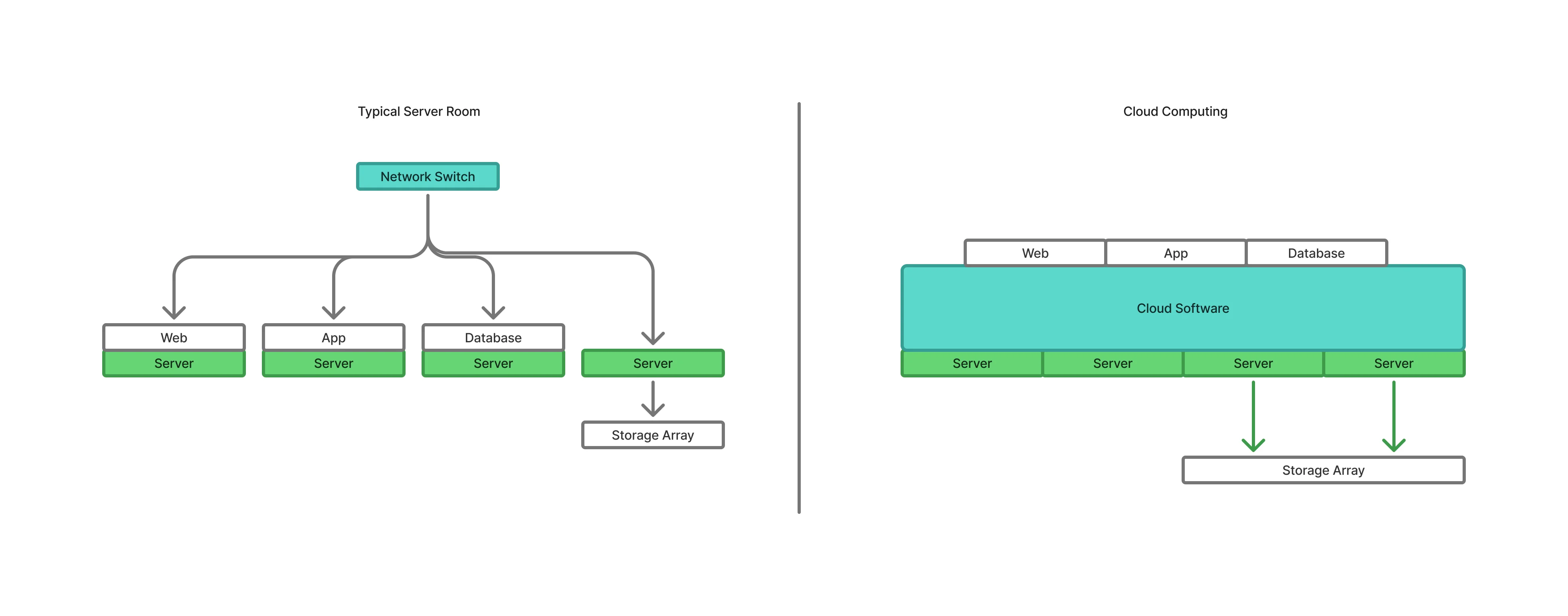
Traditionally, in a data center, you would have a cluster of servers that is dedicated to supporting a business function. The accounting department might have a server that has a storage cluster. Customer management might have a huge database server with a cluster of web servers. They all work in silo and might be glued together by an edgy network engineer. But when you are a global internet company, those things won’t work.
One of the key innovations of these internet companies is not to think of a server as fulfilling a specialized function, but to think of it as a cog of a bigger, more useful machine. Their idea was to virtualize everything. Need a server? Spin up one. A database? Spin up one. A new private network to be used for select people? Also, spin it up.
Below is what you would find in a data center and its AWS equivalents:
- App/Web Server - EC2
- Database Server - RDS
- Storage: S3
- Networking VPC
What do all those initials mean? You will find out soon enough.
The major products
AWS might have hundreds of products, but there are four things that you need to make a successful enterprise product: a server to process the data (compute), a database to organize the data, a place to store files, and networking equipment to glue them together.
Compute
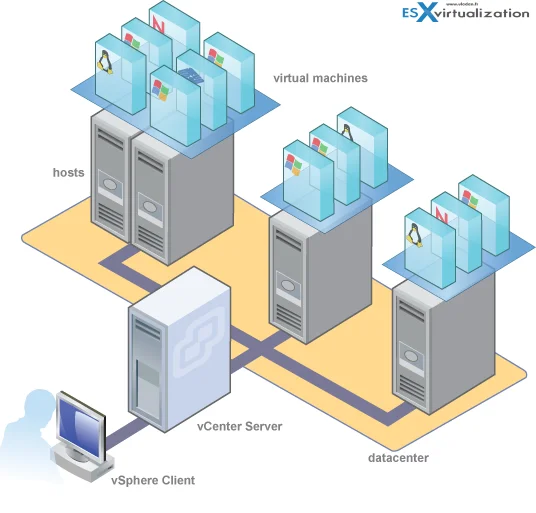
In AWS parlance, Compute represents the server. Because servers are computers … and they compute. Here are some of the products in the computer section:
- EC2: Elastic Compute Cloud. These are what represent the servers. They come in a multitude of configurations from the most basic single vCPU with 512MB of RAM to the very, very large with 32 vCPU and 512GB of RAM. There are also bare-metal instances where you control a real server. They are also expensive.
- EC2 Spot: Some clients will book EC2 instance for a certain time. And when it gets discarded, the computing resource will not be used. You can program your app to utilize these EC2 instances at a discounted rate.
- EC2 Image Build: There are thousands of EC2 images made by individuals and corporations in AWS marketplace. But you can create a custom EC2 image for your own use or sell it.
- ELB: Elastic Load Balancing. One of the key features of a resilient computing architecture is having redundant servers. ELB load balances your workload between two or more servers, and if one of the servers fails, the rest pick up the slack.
- Elastic Beanstalk: As mentioned before, the whole infra is software-defined. Elastic Beanstalk is the platform to define your servers, switches, storage, and other services so you can replicate your architecture in different AWS regions when the need arises.
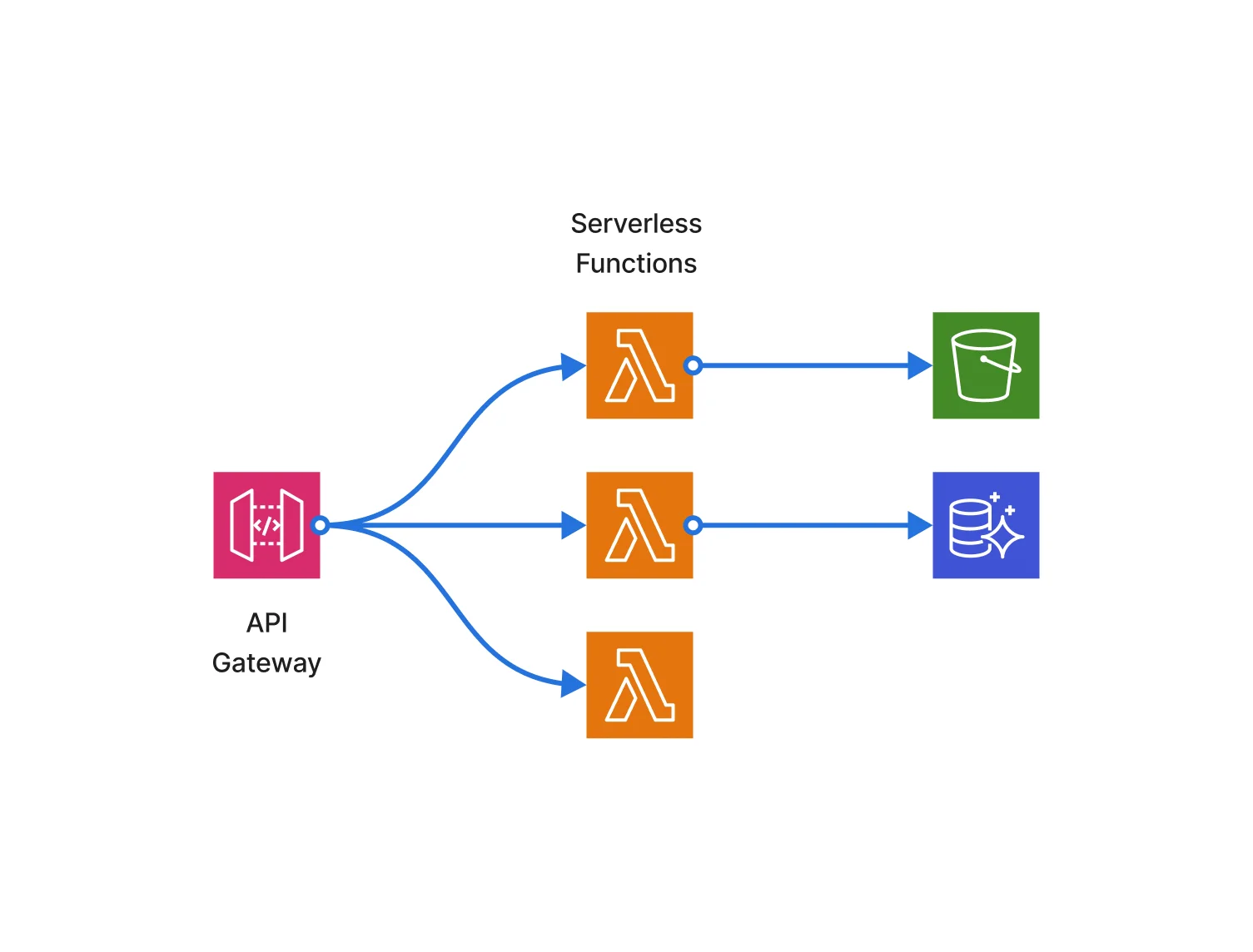
- Lambda: Instead of defining servers to run your apps, AWS has the idea to throw out the servers altogether. The server is there, but instead of worrying about it, you modify your app code so it will run a specific function. It doesn’t matter whose servers it is. It just runs a code.
- Lightsail: Instead of building everything from scratch, Lightsail provides pre-defined instances of popular web app tools like NodeJS, WordPress, and others.
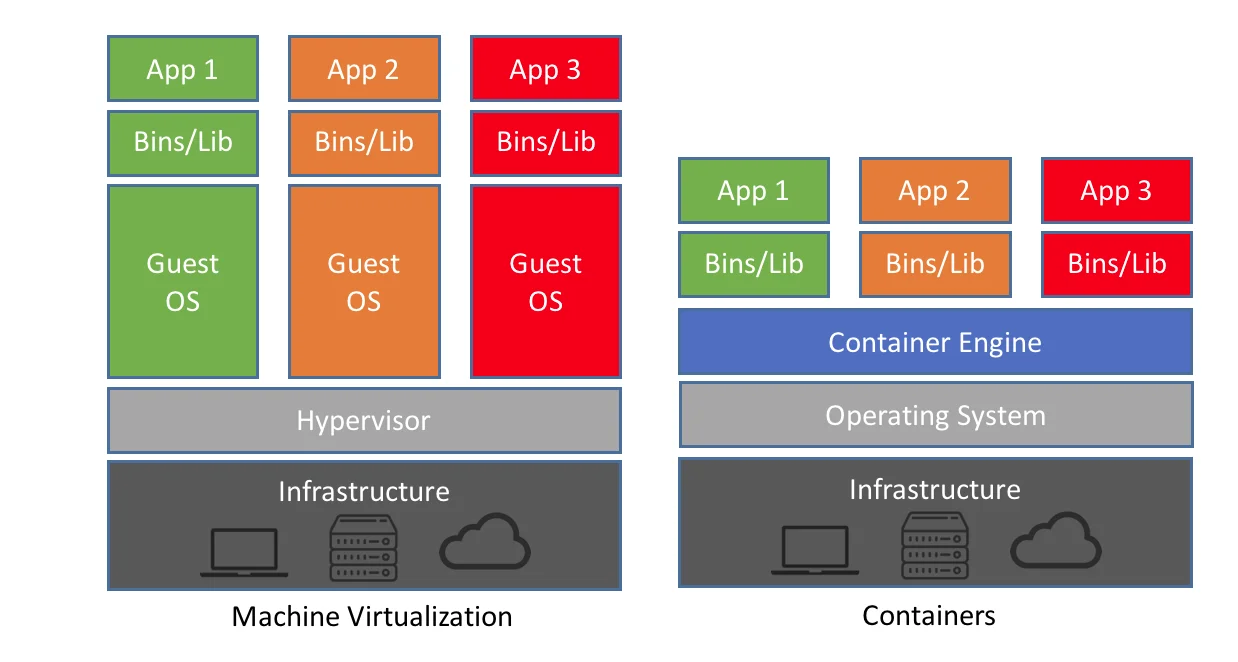
- ECS: - Elastic Container Services. Containers in computing are running virtual instances on top of specialized software that handles all the underlying networking and resource management. ECS is the platform to run those containers in AWS.
- EKS: Elastic Kubernetes Services: Kubernetes is an open-source container orchestration system to automate deployment, scaling, and management. Say you develop your site so that if there’s a huge surge in orders, you can expand new containers to manage it. Kubernetes is the software to do it, and EKS is the platform to do it in AWS.
- Openshift in AWS: Red Hat OpenShift runs on Kubernetes, but with more added features like a registry of containers and advanced networking stuff.
- ECR: Elastic Container Registry. Manage your custom containers
- Faregate: Combine containers and serverless, and you will get Faregate. You have to modify your code to use this feature.
- AWS Outposts: You can have AWS servers at your data center. You rent out the servers from AWS, and they will put them in your data center. Of course, your data center needs to meet certain conditions. The benefit is that you literally have AWS servers in your server room. Available in certain regions, of course.
- AWS Compute Optimizer: This is a feature where you let AWS analyze your EC2 usage, and it will give you recommendations on what needs to be done.
Databases
Once you have your app and web server running, you need a database to organize the data that they generates. And boy, does AWS have all the options that you need.
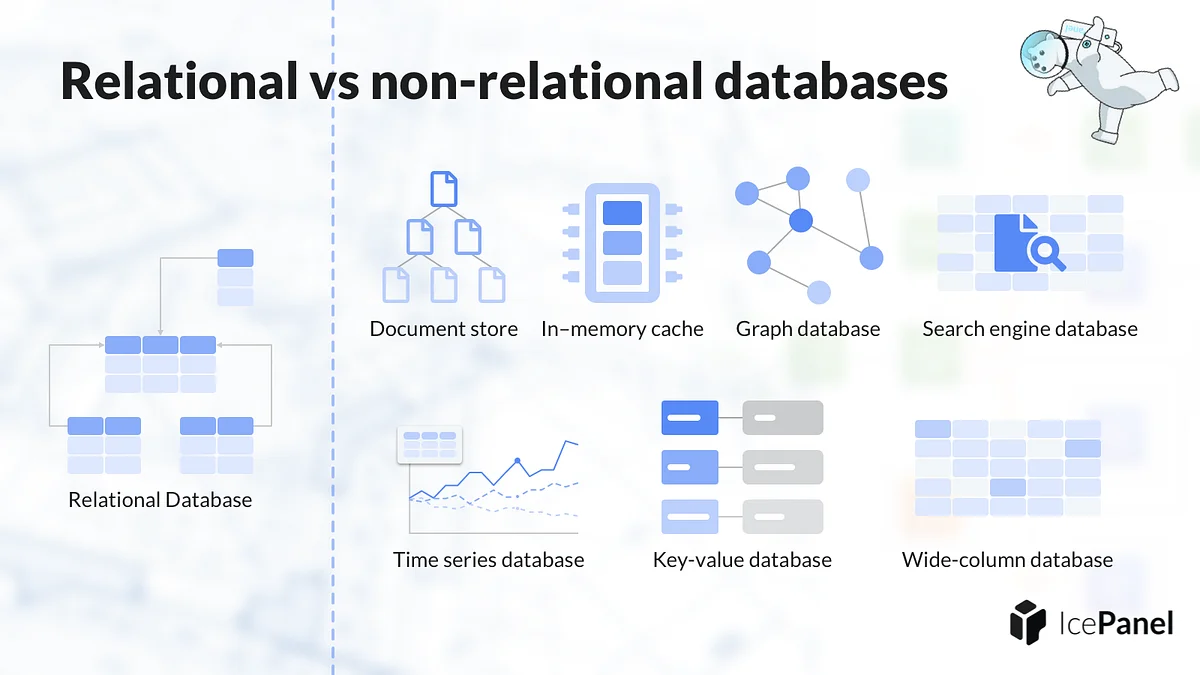
Here are some of AWS’s database products:
- Aurora: Aurora is a database product by Amazon. It offers full compatibility with MySQL and PostgreSQL.
- RDS: Before Aurora, you would use RDS to create and manage your databases. Offerings include MySQL, PostgreSQL, Oracle, Microsoft SQL, and even IBM DB2.
- Redshift: Database instances that are optimized for analytics. In other words, you would create business intelligence reports using Redshift.
- DocumentDB: MongoDB introduces the concept of NoSQL or non-relational database. DocumentDB is AWS’s own implementation of MongoDB. Although AWS claims full compatibility with MongoDB, some people debunk this claim.
- DynamoDB: AWS implementation of a NoSQL database.
- MemoryDB: An in-memory database is a database that is run entirely in memory. People use it for performance reasons. MemoryDB is an AWS in-memory DB solution.
- Neptune: A graph database is a database that uses a tree-like graph structure to represent data. The nodes at the edges of the graph are the datums, and the nodes are the structure for semantic queries. Neptune is an AWS graph database.
- Keyspaces: Apache Cassandra is a wide-column store database. What it means is that each row of a table in the database can vary in format, unlike a traditional RDBMS. Keyspaces is an AWS implementation of this.
- Timestream: This database is optimized for time-based data collection.
- Oracle@AWS: Oracle is a popular database used by companies to manage their data, and in most cases, popular enterprise app uses it to manage the app’s data. AWS provides Oracle instances for you to use.
Storage
Of course, when you get your app up and running, the app will generate data such as logs, pictures, text files, and media files. Since EC2 instances come and go, and the storage on the server is not persistent, you will need a place to store all that generated data.
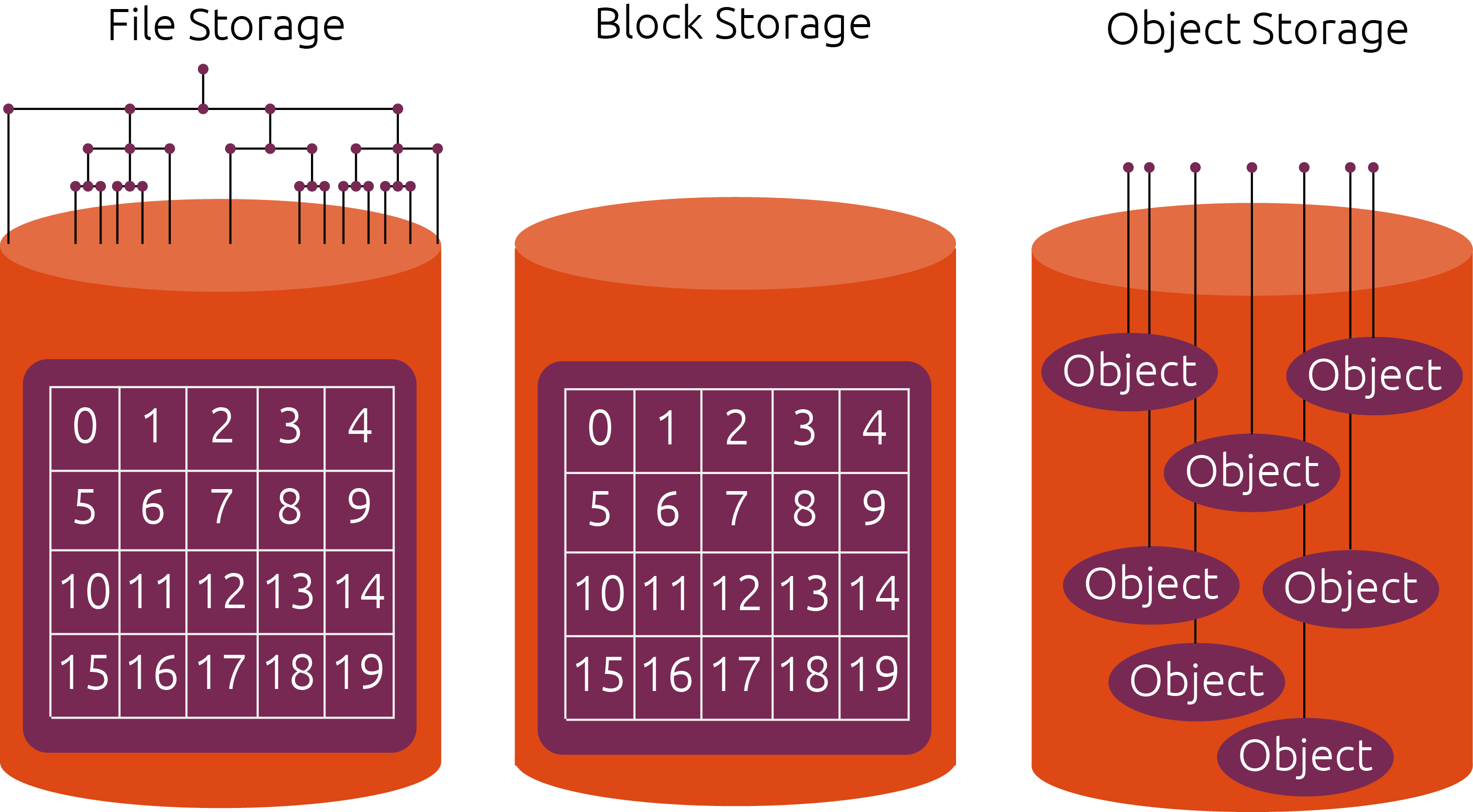
Storing data in AWS is slightly different from what you usually do with a Personal Computer. You can think of storing data in three different ways: -
- File System: This is the familiar way to store data. You put your data on a disk, organize it into folders
- Object-based: Here, you get a bucket, and you start putting files (called objects) into the bucket. There is no folder management
- Block-based: From a computer’s point of view, every storage that you see is a device with a huge block of 1’s and 0’s. The file system is the one that organizes the blocks into some meaningful data. Some software, especially databases, would like to organize the blocks themselves instead of relying on the operating system for better performance and security.
Here are the storage products by AWS:
- S3: Simple Storage Service. Object-based storage service
- Glacier: You can put some of the objects in S3 into archival storage, like magnetic tape. It’s cheaper, but access to it is slower.
- EFS: Elastic File System. File system storage that you are familiar with
- EBS: Elastic Block Storage. Block-based storage
- FSx: AWS partners up with commercial storage server vendors like NetApp and EMC to provide storage solutions on AWS.
- File Cache: In-memory filesystem for faster retrieval.
- Transfer Family: A set of tools to transfer files to S3 using SFTP, FTPS, and plain old FTP.
- Backup: Managed backup service. Like backing up your S3 to off-site using magnetic tapes.
- Storage Gateway: You rent out storage servers from Amazon and put them in your own data center. The server functions like an S3 storage service.
- Snowball: Edge network data collection.
Networking
Building those servers, databases, and storage services, you will need a way to tie them all together. All those computers are connected through a network.
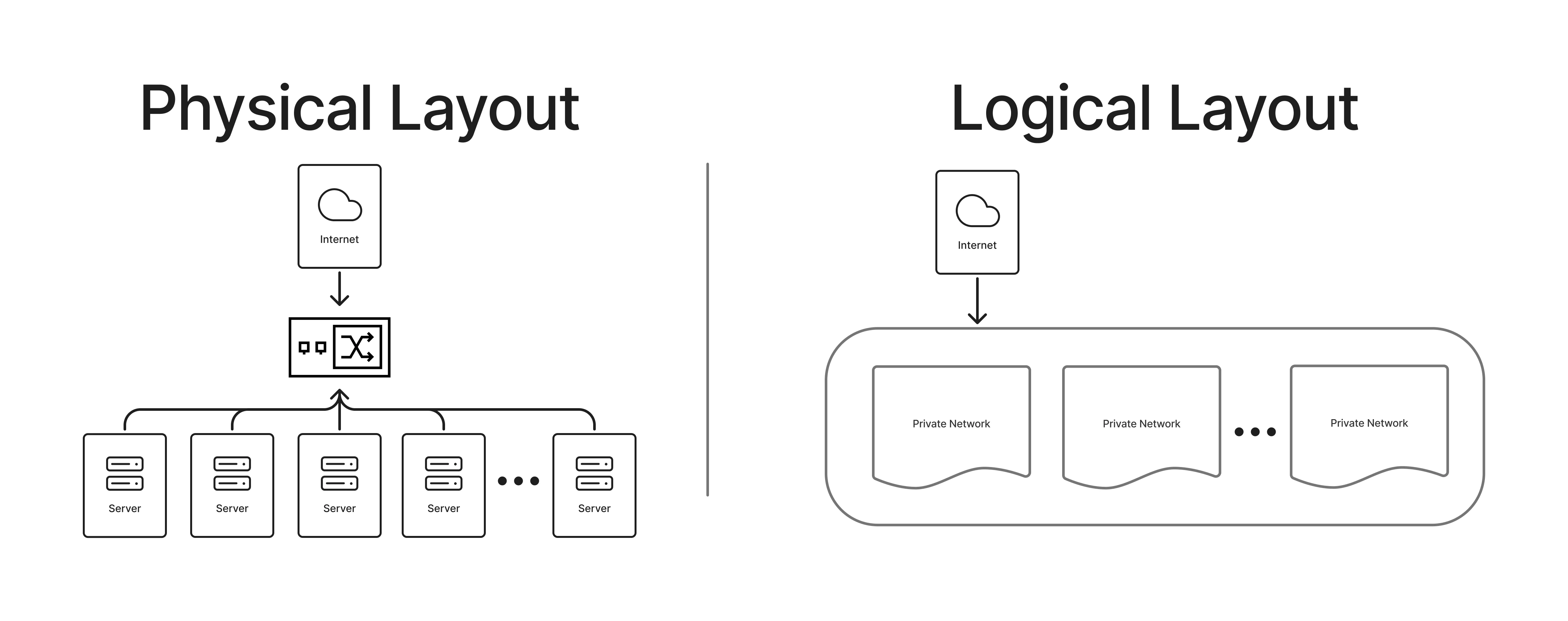
Physically, all those devices are connected in the data center and to the internet. But you still have to define the network via software. Some servers you want to be out on the internet. Some servers, like your database servers, you don’t. You can also create segments in your own network. For example, you want to separate the test environment from the production environment. Or the environment that will be used by a certain department in your company.
Here are some of the networking products that are offered by AWS:
- VPC: Virtual Private Cloud. This is the main network configuration for your cloud. Imagine you have a giant router that connects to all of your services, and here is where you define your network in the cloud.
- Route 53: DNS service. You have a domain name like google.com. Here is how you manage your domain to point to a certain server.
- CloudFront: Content Delivery Network Service or CDN. Amazon has servers around the world. This service replicates your website to those servers so people can access it faster.
- Global Accelerator: Like CloudFront but with a lot more options.
- Network Firewall: Firewall service. You limit what ports are available to your servers (and everyone else). You also limit who can access those services.
- Firewall Manager: If you have multiple firewalls, this is the way to manage them.
- PrivateLink: VPN service.
- Transit Gateway: A way to connect your on-prem networks to AWS networks.
- API Gateway: A typical web app would have a software router that directs traffic from a web address to a function in your web app. API Gateway does the same thing, but you can direct traffic to another service like an S3 server or a Lambda function.
- ELB: Elastic Load Balance. Balance the network load between services in your cloud.
- AppMesh: Manage a network of containers and microservices.
- CloudMap: Build a dynamic map of your cloud.
- Shield: Protection against Distributed Denial of Service (DDoS) attacks. This is when a hacker attacks a lot of computers to send messages to your server, and eventually overloads your servers with erroneous requests.
- Web Application Firewall: One of the dangers of having a web app is that a bot might come in and scrape your data. Another danger is injection, where a hacker might manipulate your forms to trick the server into giving up private data. WAF is the service that prevents this.
- DirectConnect: In certain data centers, they have networking equipment that connects directly to AWS. You put your servers in that data center and rent out the connection so you have a private, secure connection to AWS.
- Site-To-Site VPN: You create a VPN tunnel between your servers and AWS.
- Client VPN: Your (human) works would download this software and create a VPN link to your AWS servers. Need to configure Site-To-Site VPN for this to work.
- Cloud WAN: If you are a large organization with multiple sites, networking structures, and AWS networks in multiple locations, Cloud WAN is the tool to manage the networking part of it.
Other services
If you reach here, congratulations, and thank you for being with us. The above sections are what you would most likely find in any data center and are likely to be sufficient for running a global enterprise. But this is AWS. It literally invented the term hyper-scale.
As mentioned before, Amazon runs its data center as though it were a single monolithic computing platform. There’s no individual server doing a job. It’s just commodity hardware providing resources to solve a given task.
Analytics
Data is the black gold for internet companies. Massive fortunes are made by knowing what your customer is looking at, what excites your customers, and anticipating what your customer needs even before the customer knows what it needs. To do that, you need analytics. Business Intelligence has been around for decades, but new technology has taken it to new heights.
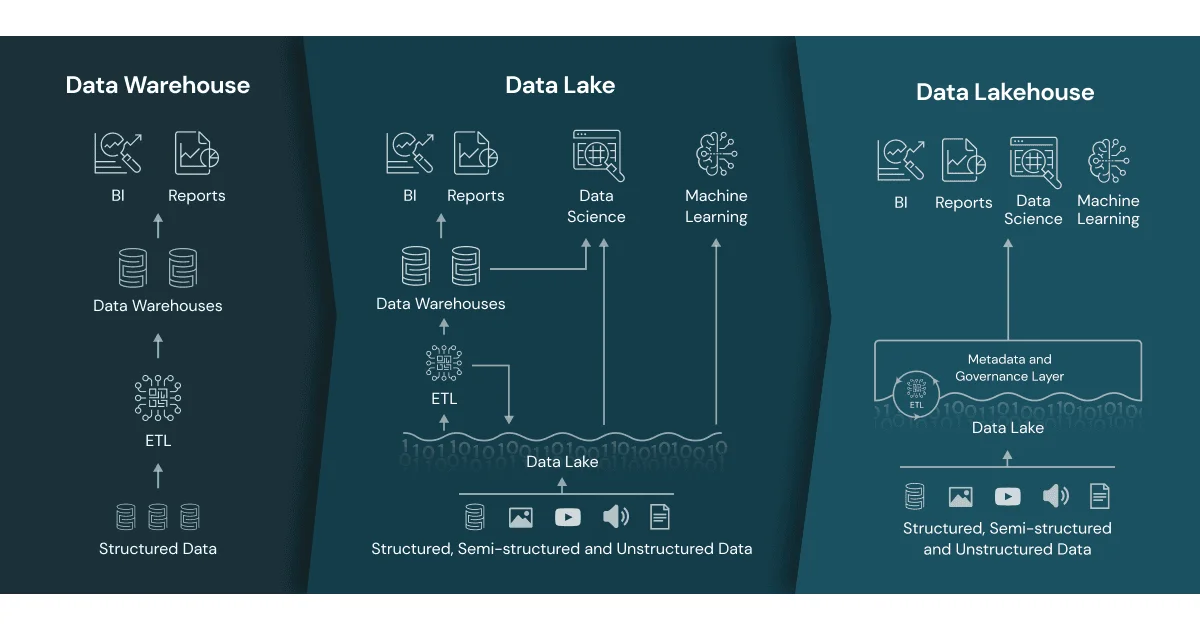
Here are some of the Analytics products that leverage the AWS platform:
- S3 Data Lake: - from your S3 bucket, you can create a Data Lake to analyze your data
- Lake House: - The next level of Data Lake is the Data Lake House, where you manage a few Data Lakes and also take in sources from other places.
- Glue: It is a serverless toolkit to manage your data stream. In the past, we used the ETL (Extract, Transform, Load) process to collect data. Glue is supposed to automate this process.
- Data Firehose: Your site might generate a lot of data. You use the firehose to manage the flow of your data to your data lake or your data lake house.
- Kinesis: If you are running a streaming site, you can use Kinesis to collect, process, and analyze video and data streams.
- Athena: Athena provides SQL service for your S3 buckets
- Redshift: Redshift provides SQL analytics for your data lake house.
- QuickSight: A Business Intelligence (BI) tool to create reports and dashboards to help visualize your data. Older people used Crystal Reports, Power BI, and Tableau to do similar things
- OpenSearch: Apache OpenSearch is a search engine that also provides analytics on search. You integrate into your website to see what people are looking for.
- DataZone: It is a tool to manage your data sources.
- Managed Service for Apache Flink: Apache Flink handles stream and batch processing.
- Managed Streaming for Apache Kafka: Apache Kafka is a distributed event-streaming platform. It provides a data feed to be used by other sites.
- Managed Workflow for Apache AirFlow: Apache AirFlow is a workflow management platform for data pipelines. In computing, a workflow is a series of steps to complete a task. This software manages the workflows.
- SageMaker: This is a tool to help create training data for your Machine Learning (ML) models. To be used with SageMaker AI to train your ML models.
Application Integration
In many web app frameworks like Laravel, NodeJS, React, Ruby on Rails, and Vue, you will have features like message queuing, API router handling, Event Manager, Notification services, and so on. AWS takes it on another level by providing those tools that utilize the entire AWS resources. However, you will have to modify your application to take advantage of the features.
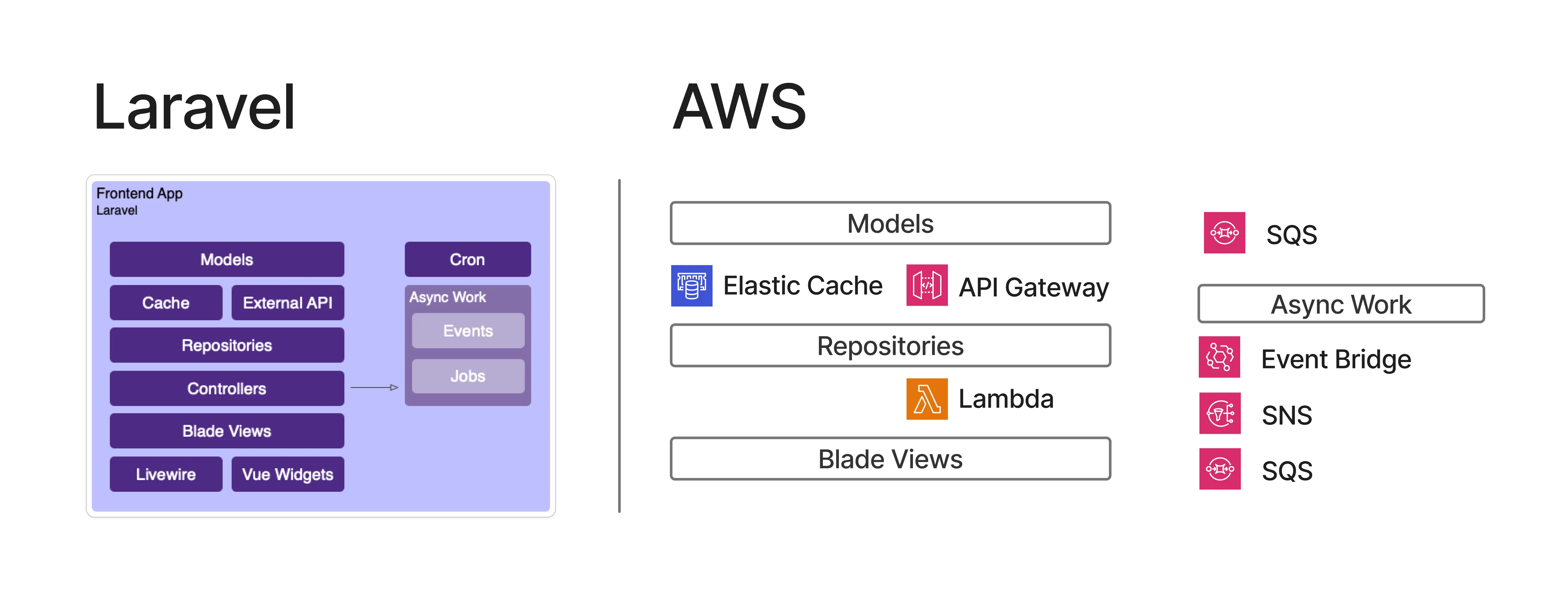
These are the Application Integration products by AWS:
- API Gateway: In a web framework, there will always be an API router where, if a user goes to a certain address on your site, the router will direct the traffic to a certain part of your code to handle it. API Gateway does exactly this, and you can direct it to any AWS resource to handle it.
- Event Bridge: Utility to respond to a predefined event
- SNS: Simple Notification Service. This allows your app to send notifications to your user’s email, phone, or even the app itself.
- SQS: Simple Queue Service. Sometimes your client’s request is a long-running one, and you would like to put that in the background or, even better, control the workload so your servers won’t get overwhelmed.
- MQ: Message Queue. It’s like SQS but with more advanced controls and features. Uses ActiveMQ or RabbitMQ for queue handling.
- Step Functions: Serverless workflow. As mentioned before, a workflow is a series of steps that completes a task. Using a Step Function means you don’t have to worry about what kind of servers run the workflow.
- AppFlow: Helps transfer data from one application to another.
- Managed Workflow for Apache AirFlow: As mentioned before, Apache AirFlow is a workflow management software.
- B2B Data Interchange: Sometimes you want to take your data out to be processed outside of AWS. This feature exports your data as JSON to XML to an external site.
- Integrated Application Test Kit: A testing suite for your app.
Security and Identity Management
Having all these features, services, servers, storage, networking, and such can be daunting to manage. What’s more important is to make sure that the right people have the right access to your AWS resources.
There are two main identity products in AWS: IAM (Identity and Access Management) and Cognito. The big difference is that IAM is meant for people who are using your AWS resources, while Cognito is meant for people who are using your site.
Here are some of the IAM-related products to help manage your identities and privileges:
- IAM Identity Center: To manage all of your IAM identities
- Verified Permission: To manage permissions of your IAM identities
- Organizations: To manage your AWS environment. For example, a test environment might be able to do a limited set of things and be managed by a certain group of people.
- Resource Access Manager: Use this to manage access to an AWS resource.
- Directory Service: A lot of enterprises use Microsoft Active Directory for identity management. Directory Service allows you to manage your identity using Microsoft AD.
AWS also has security-related products that help to manage your AWS resources:-
- GuardDuty: Intelligent threat detection
- Security Hub: A centralized security check and alerts platform
- Detective: Analyze Security Threats
- Security Incident Response: Manage and analyze security events.
Some of the security products are also related to network products such as Network Firewall, Firewall Manager, Shield, Web Application Firewall, and Cloud Trail.
Cloud Operations

When your dynamic website serves a few people per hour, you can manage with a simple server and maybe a single storage and database instance. But if you are a large company that sells millions of products and services that stream through the world with a billion people as your customers, you will need some help taming your cloud operations.
These are some of the products offered by AWS to manage your ever-growing cloud:
- Control Tower: Manage multi-account AWS environment
- Config: Assess, audit, and evaluate the configuration of your resources
- CloudTrail: Track user activity and API usage. Work in conjunction with API Gateway
- CloudWatch: A tool to optimize your workflow
- Systems Manager: Manage your nodes
- Trusted Advisor: Cost optimizer. A bit of an oxymoron in AWS. Reviews your AWS resources and sends recommendations on how to save money.
- Resilience Hub: Plan your resources so that your cloud can be resilient in case of an outage. Many people think this is not necessary, but AWS outages do happen.
For the end-users
Many of AWS’s products are meant to be for back-end operations. However, back in the early days of computing, when you wanted to use the computer, you would literally dial up to the computer and use it right there, instead of doing all the work in a personal computer. There are some ideas, like giving access to these powerful computers in a controlled session, allowing the user to do the necessary work without the cost and baggage of maintaining a huge workstation.
Here are some of the user-facing products that AWS offers:-
- Workspaces: Virtual Desktop. Users would have access to a powerful machine anywhere around the world and do work as though they’re at the desktop itself.
- Workspaces App: An app is streamed to a browser.
- Workspaces Thin Client: Users use a weak computer to connect to the powerful servers.
Artificial Intelligence
The latest thingamajig is Artificial Intelligence, where AI will replace every job made by everyone. Whether this is true or not remains to be seen, but you can bet major companies like Amazon will not be left behind.
Here are some of the AI-related products that can be used in AWS:
- Bedrock: Gives you access to AI models from a variety of sources, or even your own. You can then incorporate the access to your app.
- Bedrock AgentCore: Extends access to agentic AI models. AI models that respond to events or do a given task step by step.
- Nova: A couple of models from AWS that allow you to generate text, images, audio, and video.
- Inferentia: Amazon’s own Machine Learning chip
- Trainium: Amazon’s own ML chip optimized for training and deep learning
- Q: I guess the name is based on a Star Trek character. It is a generative AI assistant that you can embed in your app. Mostly used as a verbose chatbox assistant.
- Connect: Automated contact center. Users will contact this agent, and AI will supposedly help the customer.
Other Services
With all that extensive line of products, you would think that that is all from AWS? Well, dear reader, you will be so wrong. There are even more products from AWS that cover specialized workloads that you might need a cloud provider for. Here are some of the products by segments
- Gaming: GameLift dedicated gaming servers to host your games. There’s also GameLift Streams to stream your game from the server to end-users in 1080p
- Developers: There’s App Studio to monitor your app, App Config to configure your app, Cloud9 to develop your app, CloudShell to manage your cloud using a command-line interface, CodeBuild to for Continuous Integration, CodeDeploy to automate your deployment, CodeCommit to host your git repo and CodePipeline for Continuous Delivery.
- Internet of Things (IoT): Someone has the genius idea of connecting every device from lightbulbs to ovens to the internet, and these are some of the tools to manage them. There’s IoT Core, the main toolkit to manage them, IoT Analytics to get statistics like usage and popularity, IoT Device Defender to prevent malicious attacks, FleetWise for fleet management, and SiteWise for industrial products.
- Media Services: If you building a streaming empire, these are some of the AWS products that might help: Deadline Cloud to manage your render farms, Elastic Transcode for media transcoding, like putting subtitles on your videos, Interactive Video Service to handle live streams, MediaConnect to handle media streams from the servers to the users, MediaTailor to help with personalization, MediaPackage to handle format conversion, and Kinesis Video Stream which capture, process and provide analytics on your media streams.
- Quantum Computer: Yes, you can rent a quantum computer from AWS using Braket
- Satellite connections: AWS has Ground Station around the world to help feed data from your satellite to AWS.
- Blockchain: A few years ago, blockchain was supposed to take over the world, until it didn’t. AWS has a Managed Blockchain Service if you need it again.
Why So Many Products
With hundreds of products from AWS, one must wonder why AWS has so many products and who uses them. AWS’s #1 customer is Amazon, which is one of the world’s most visited websites. Amazon no longer just sells books or the million other items worldwide; it is also a music streaming service, a video streaming service with original content, a gaming company, and an audiobook streaming service. Not to mention, they also have Alexa, the digital smart assistant, and Rufus, an AI chatbot that is supposed to help you with shopping.
So everything that Amazon offers and needs, they built it on AWS and sell those infrastructures and features to everyone else. So their business is no longer selling items or services, but also the infrastructure to do so.
Another reason, which might be hard to swallow: vendor lock-in. You might host a virtual server with storage and databases to build your app. However, once you utilize their more advanced features, such as Lambda serverless functions or API gateway, it becomes tough to move away from AWS. And it’s even harder when you are a big customer that is entrenched in the AWS product ecosystem.
Conclusion
AWS is one of the most impressive IT products in the world. Imagine having an IT infrastructure that spans globally and can call up one of the most powerful computers from just a single command.
AWS is one of Amazon’s most important products, not because it runs Amazon itself, but arguably, it also helps run the internet itself. AWS is also important to Amazon because, in 2024, despite only making 1/4th of Amazon’s revenue, AWS is responsible for half of Amazon’s profits.
As a large tech and internet company, AWS will continue to evolve and be more complex as Amazon tries its best to maintain technological leadership. If there’s a new trend in Information Technology, you can bet AWS will be in it.
Plug
Support this free website by visiting my Amazon affiliate links. Any purchase you make will give me a cut without any extra cost to you
| Base | Pro | |
|---|---|---|
| iPhones | iPhone 16 / iPhone 16 Plus - (Amazon) | iPhone 17 Pro / iPhone 17 Pro Max - (Amazon) |
| iPhone Accessories | Find them at Amazon | |
| Watch | Apple Watch SE (Amazon) / Apple Watch Series 11 | Apple Watch Ultra 3 (Amazon) |
| AirPods | AirPods 4 (Amazon) | AirPods Pro 3 (Amazon) / AirPods Max (Amazon) |
| iPad | iPad 10 (Amazon) / iPad Mini (Amazon) | iPad Air M3 (Amazon) / iPad Pro M5 (Amazon) |
| Laptops | MacBook Air M3 (Amazon) | MacBook Pro M5 (Amazon) / MacBook Pro M4 Pro/ M4 Max (Amazon) |
| Desktop | Mac Mini M4 / M4 Pro (Amazon) / iMac M4 (Amazon) | Mac Studio / Mac Pro |
| Displays | Studio Display (Amazon) | Pro Display XDR (Amazon) |
Other Ecosystem Items